01 / Check structure and connections
In Structure Overview choose Traditional Welded. Use two columns, one beam layer and No. 5 channel sections: 1800 mm span, -1200 mm column height and 3000 mm support spacing. Check steel, plates, welds, anchors and concrete conditions as well as pipes.
02 / Enter the pipes directly
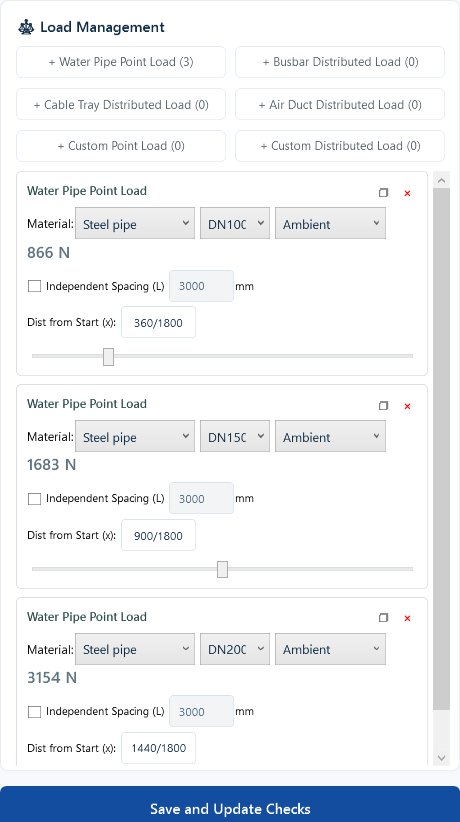
Add three ambient-temperature steel water pipes in beam load editing: DN100 / DN150 / DN200 at 360 / 900 / 1440 mm. With global spacing, displayed design loads are 866 / 1683 / 3154 N. Save and update the checks.
03 / Read member and connection results
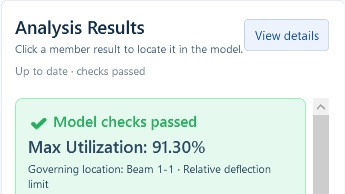
Start with the overall summary, then inspect beams, columns, welds, plates and anchors. Example deflection is 6.58 mm against 7.20 mm; maximum utilization is 91.30%. Resolve missing inputs, warnings and failed items rather than relying on a pass label.
Review members and connections together
- Members: review beam and column checks
- Welds: review beam-column and column-plate joints
- Fixings: review base-plate and anchor checks
For this example with an 1800 mm span and 3000 mm support spacing, beam deflection is 6.58 mm against a 7.20 mm limit. Maximum utilization is 91.30%. The pass result applies only to the conditions entered for this example.
04 / Save and review before delivery
Save the separate project, reopen it and recalculate. Match results to current inputs, enter real project details and export. The responsible engineer must review the complete report, adopted standards and installation conditions.