STRUCTURE CUBE / PRODUCT / V3.0.4

Support structural analysis, from model to report.

Structure Cube is MEIGONA's Windows software for prefabricated and welded building-services supports and hangers: modelling, structural checks, material schedules and calculation reports.

Watch the product film · 1:56 · Chinese audioFollow the video lessons →

01 / MODEL & LOAD

Start with clear inputs.

Follow a prefabricated support with three water pipes. Match the arrangement, span and loads.

STRUCTURE CUBE / V3.0.4REFERENCE CAPTURE
Actual physical view · Three water pipes placed on the beam

SELF-BUILT DEMO / INPUTS

Beam span
1500 mm
Support spacing
2000 mm
Pipe condition
Steel · Water-filled · Ambient
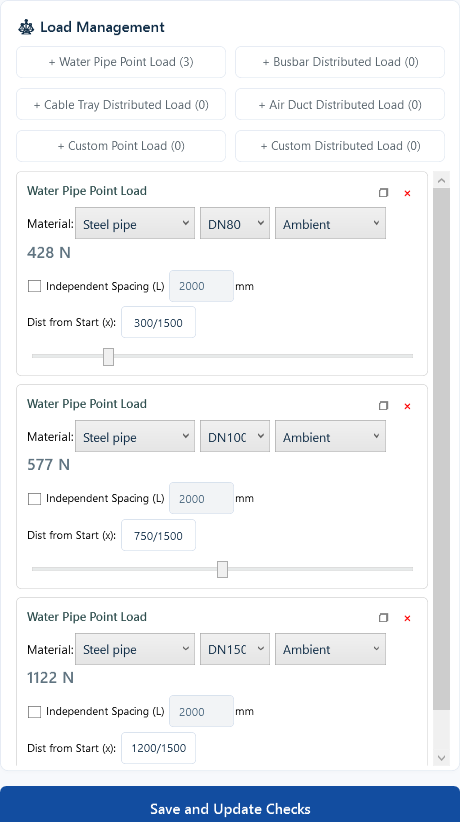
Loads calculated from pipe size and spacing
PipeFrom beam startDesign load
DN80300 mm428 N
DN100750 mm577 N
DN1501200 mm1,122 N

Pipe selections determine the displayed design loads. Member self-weight is also included. Check each input against the arrangement.

View the actual pipe-input interface
STRUCTURE CUBE / V3.0.4REFERENCE CAPTURE
Actual controls · Pipe size, spacing and position

02 / CHECK & SIZE

Find the issue. Compare a revised solution.

Identify the issue

STRUCTURE CUBE / V3.0.4REFERENCE CAPTURE
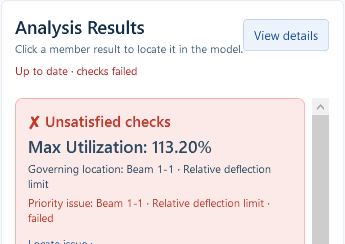
Before / C41 beam
Before / C41 beam

Beam deflection is 6.79 mm, above the 6.00 mm limit for this example.

Run smart sizing
STRUCTURE CUBE / V3.0.4REFERENCE CAPTURE
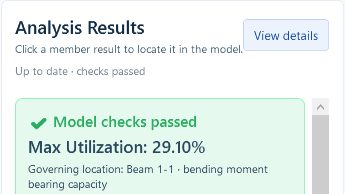
After / C41D beam
After / C41D beam

Smart sizing selects a C41D beam; deflection reduces to 1.21 mm.

Pipe sizes, positions, span and support spacing stay the same. Sizing also updates the matching connector configuration and member self-weight. Maximum utilization changes from 113.20% to 29.10%.

03 / REPORT DELIVERY

Support calculation reports, connected to inputs and results.

Follow one self-built teaching case from model and load inputs to structural checks and calculation report output. Enlarge the actual Chinese and English cover, design-basis and arrangement excerpts.

Free Edition provides unlimited watermarked PDF and no Word. Enterprise-native projects allow Word and watermark-free PDF; free-project restrictions remain. Formal delivery requires review of the complete report.

Open the full prefabricated demonstration →Check export rights and steps →
Same case · Design basisSame case · Structural arrangementSame case · Exported cover

ENTERPRISE-NATIVE PROJECT · ACTUAL EXCERPTS FROM A SEPARATE ENTERPRISE BUILD · ENLARGE EACH PAGE

ANOTHER STRUCTURAL SYSTEM

Explore a welded support, too.

A separate teaching case focuses on members, connection welds and fixing conditions.

Explore the welded demonstration →
CAD / Revit collaboration and environment

Start from existing drawings and models.

Recognize, review adopted data, then calculate in the main application. Candidates, review items and transfer receipts are not passed checks.

CAD · Use Import settings, Pipe picking and Transfer in the Structure Cube ribbon: SCIMPORTSETTINGS, SCPIPEMAP and SCEXPORT. Start with one complete support and related services; review dimensions, sections, sizes and load assignment after transfer.

Revit · In the Structure Cube tab, review General settings before One-click calculation. Preselect multiple targets, or follow the single-object pick prompt when none is selected; Esc cancels. Review each group’s families, roles, sizes and pending items. Confirm all does not replace review.

After reception, verify the calculation unit, model and adopted values in the application before calculating. Accepted or queued receipts do not establish that a model has finished loading. Keep the host version, entry point, exact message and a redacted screenshot when troubleshooting.

These are current V3.0.4 operation facts, not completed end-to-end acceptance inside CAD/Revit. The application Light/Dark selector does not change plug-ins or Autodesk hosts. Confirm compatible versions and adaptation scope for the actual environment and agreement.

Check your CAD / Revit environment →Check the preparation guide →
Product and application guide · online

V3.0.4 · Actual workflows, selection comparison, bilingual report excerpts and edition rights. Full engineering reports are not included.

Choose an edition, then get started.

All editions include the complete standard calculation features. Licensing, exports and service rights differ. How to choose support software →

Editions & rightsDownloads & tutorials
About these demonstrations

Current main-application captures use actual V3.0.4 Free Edition controls in Light mode with isolated self-created data. Both cases were reloaded and calculated; smart sizing was executed for the prefab case. Free Edition supports watermarked PDF only; enterprise outputs are verified separately using an enterprise build. These are not customer projects or independent engineering reviews.

Public material is limited to physical arrangements, pipe inputs, result headers and cover, basis and arrangement excerpts from the same cases. Internal models, source code, force diagrams, connection parameters and full reports are excluded. Project conclusions require professional review of complete inputs and reports.

Meet Structure Cube.

Video tutorial · 1:56 · Chinese audio / Chinese interface

XiaoanV3.0.4 GUIDANCE

MEIGONA AI Technical Assistant

A CLEARER NEXT STEP

Hello, I’m Xiaoan.
Where can I help?

Find a usage guide, or put together a clear description of an issue.

V3.0.4 usage guidance is available. AI availability is checked on opening; uncertain issues can go to human support.

Enter to send · Shift+Enter for a new line