STRUCTURE CUBE / WORK GUIDE / V3.0.4

← Written tasks

Your first deliverable: from model to archive

Complete a self-built exercise and explain how inputs, results and delivery files correspond.

Follow → Verify → Repeat independently
01

Confirm the calculation unit, system and units; use a separate training filename.

CHECKIdentify the current calculation unit and where mm and N apply. Keep training separate from production work.

Open the operation steps →
02

Create two columns and one beam; select sections, supports and connectors.

CHECKCheck member counts, dimensions and connection locations against inputs. Do not infer restraints from a picture.

Open the operation steps →
View the actual interface and notes
STRUCTURE CUBE / V3.0.4REFERENCE CAPTURE
Existing self-built prefabricated demonstration: physical layout; see the linked lesson for conditions
03

Enter loads and verify positions, directions, support spacing and parameter sources.

CHECKMatch each action to a real object, units, position and adopted value. Review local defaults separately from the adopted records on existing loads.

Open the operation steps →
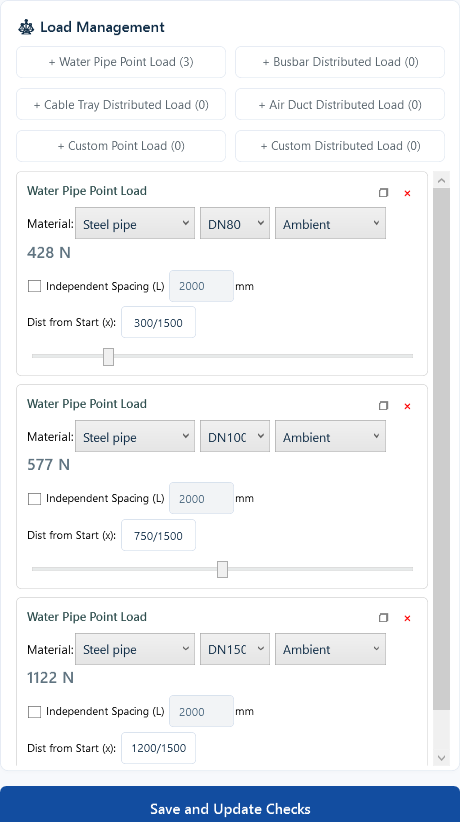
View the actual interface and notes
STRUCTURE CUBE / V3.0.4REFERENCE CAPTURE
Pipe inputs from the same demonstration: verify locations and adopted values
View the settings entry reference
STRUCTURE CUBE / V3.0.4REFERENCE CAPTURE
V3.0.4 Light reference · Water Pipe Load page, with the Configure load factors entry; not the seven-factor settings page
04

Calculate, read messages and failed checks, then change one condition and recalculate.

CHECKDistinguish missing input, stale results and failed checks. Keep other comparison conditions unchanged.

Open the operation steps →
05

Fill project information and export the permitted report; configure and verify the material bill separately in BOM01.

CHECKComplete project, author, reviewer and date fields. Match the report to the latest calculation. Quantities do not establish structural safety.

Open the operation steps →
View the actual interface and notes
STRUCTURE CUBE / V3.0.4REFERENCE CAPTURE
Actual export window from the same demonstration: verify fields and rights separately
06

Save and reopen, match inputs with output revisions, then repeat without step-by-step prompts.

CHECKReopened inputs agree with deliverables. Explain the effect of one change rather than merely recalling buttons.

Open the operation steps →

REPEAT / CHECK / EXPLAIN

Repeat independently, without the prompts.

For self-review on this page only; not saved after leaving and not engineering approval or training certification.

Scope, cautions and knowledge references

This task connects the existing operation lessons. Demonstration products and results apply only to their documented conditions, not directly to real projects.

Completion means repeating independently, explaining input sources and matching the project to its deliverables. Formal work still requires responsible professional review.

← Back to written tasks

XiaoanV3.0.4 GUIDANCE

MEIGONA AI Technical Assistant

A CLEARER NEXT STEP

Hello, I’m Xiaoan.
Where can I help?

Find a usage guide, or put together a clear description of an issue.

V3.0.4 usage guidance is available. AI availability is checked on opening; uncertain issues can go to human support.

Enter to send · Shift+Enter for a new line