01 / Create the arrangement
In Structure Overview choose Prefabricated, two columns and one beam layer. Set span to 1500 mm, column height to -1200 mm and support spacing to 2000 mm. Start with C41 members and check seats, connectors, anchors and site conditions.
02 / Add three water pipes to the beam
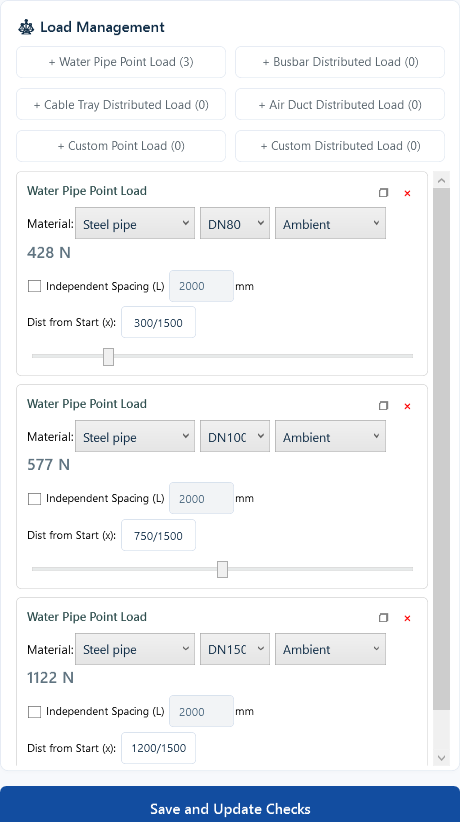
Open beam load editing and add Water Pipe Point Load three times. Choose steel pipe at ambient temperature: DN80 / DN100 / DN150 at 300 / 750 / 1200 mm from the start. Keep global spacing; the interface shows 428 / 577 / 1122 N. Save and update the checks.
03 / Locate the failed check and change the section
The initial C41 beam deflects 6.79 mm against a 6.00 mm limit. Keep pipes, positions, span and support spacing unchanged. Use C41 and C41D candidates with Economy First, an 80% utilization target and 5 mm deflection target. Smart sizing selects C41D and updates the matching connector configuration. After recalculation, deflection is 1.21 mm and maximum utilization is 29.10%.
Identify the issue
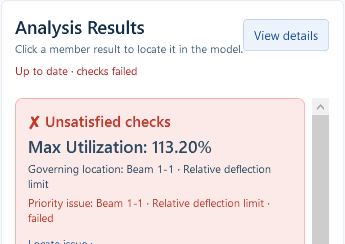
Beam deflection is 6.79 mm, above the 6.00 mm limit for this example.
Run smart sizing
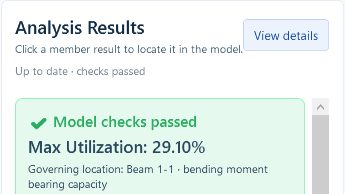
Smart sizing selects a C41D beam; deflection reduces to 1.21 mm.
Pipe sizes, positions, span and support spacing stay the same. Sizing also updates the matching connector configuration and member self-weight. Maximum utilization changes from 113.20% to 29.10%.
04 / Save, reopen and prepare output
Save a separate project, reopen it and calculate again. Confirm that results match current inputs. Enter real project and review details, export according to edition rights and complete professional review.